

Memory
Our long term goal is to solve memory in pursuit of software personalization through decentralized memory networks. We plan to use parametric approaches similar to those described in the Memory Layers at Scale paper by the FAIR research team at Meta. We test these experiments by deploying them in Tiles, where users can try them and provide real-world feedback. This feedback informs our ongoing research and is incrementally incorporated into future builds.
Memory Model Trained with Online RL
Our first experiment explores bundling a fine-tuned model to manage context and memories locally on-device using hyperlinked Markdown files. Currently, we use the mem-agent model from Dria, based on qwen3-4B-thinking-2507, and are in the process of training our initial in-house memory models. Read more about their training process and scaffolding design in their paper here.
These models use a human-readable external memory stored as Markdown, along with learned policies trained via reinforcement learning on synthetically generated data. These policies decide when to call Python functions that retrieve, update, or clarify memory, allowing the assistant to maintain and refine persistent knowledge across sessions.
Tiles 0.4.7 is the last release that includes this experiment; later versions removed this code path. To test it, download Tiles 0.4.7 from the changelog release (or use any earlier release) and run tiles run -m.
Implementation
The agent works with Obsidian-like directories of Markdown files as its knowledge base. These files are both human-readable and hyperlinked. The core protocol is defined in a single system prompt. The source is available here.
Dria trained a fine-tuned model so the agent strictly adheres to the enforced prompt format.

Model generated Obsidian format Markdown file
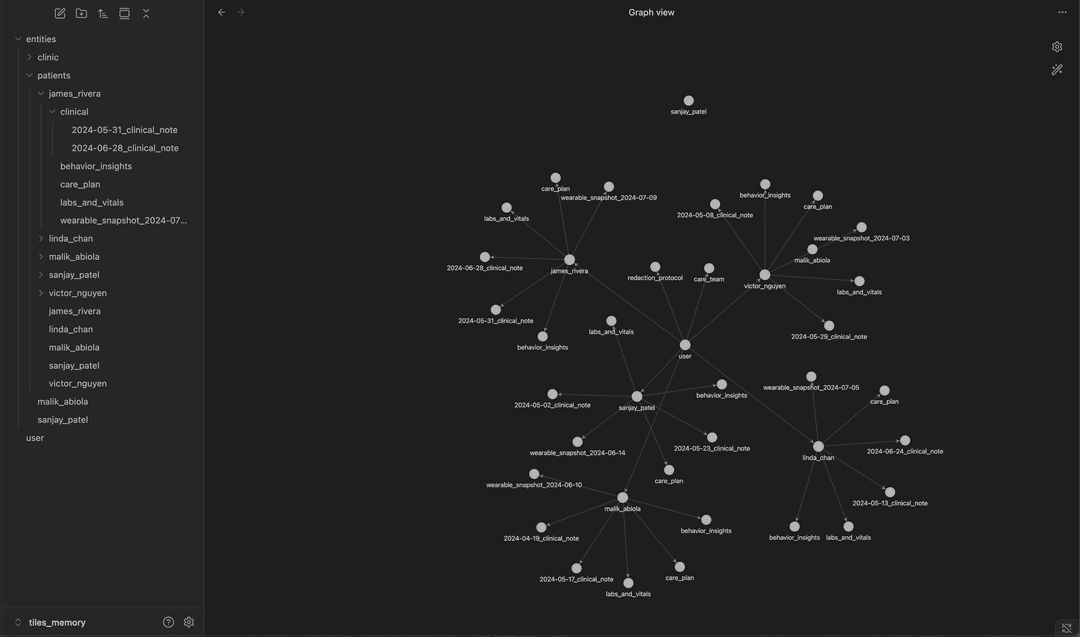
Test user folder structure and the resulting knowledge graph
Response Structure
The model’s response is split into three structured sections:
<think>: reasoning<python>: executable code that calls predefined functions<reply>: final output after memory interaction
Execution
The Python block is executed in a sandbox, and its results are returned as <result> tags. This is how the agent forms its reasoning to action loop.
Pattern 1: When interacting with memory
<think>
[Your reasoning here]
</think>
<python>
[Your Python code here]
</python>
Pattern 2: When NOT interacting with memory
<think>
[Your reasoning here]
</think>
<python></python>
<reply>
[Your response to the user]
</reply>
Tiles executes the generated Python code in a sandbox. The code calls tools such as create_file, update_file, and others mentioned above. These tools are plain Python functions.
def create_file(file_path: str, content: str = "") -> bool:
    """
    Create a new file in the memory with the given content (if any).
    First create a temporary file with the given content, check if
    the size limits are respected, if so, move the temporary file to
    the final destination.

    Args:
        file_path: The path to the file.
        content: The content of the file.

    Returns:
        True if the file was created successfully, False otherwise.
    """
    temp_file_path = None
    try:
        # Create parent directories if they don't exist
        parent_dir = os.path.dirname(file_path)
        if parent_dir and not os.path.exists(parent_dir):